
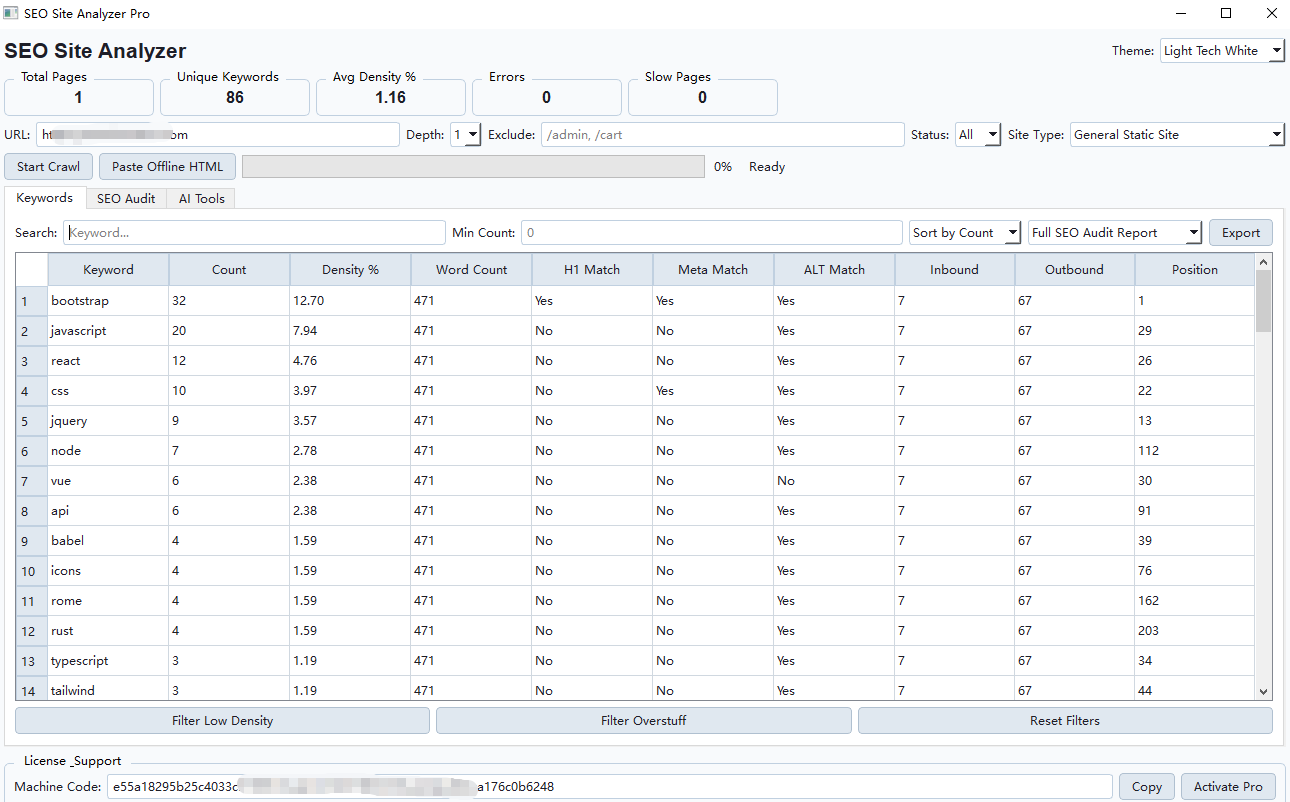
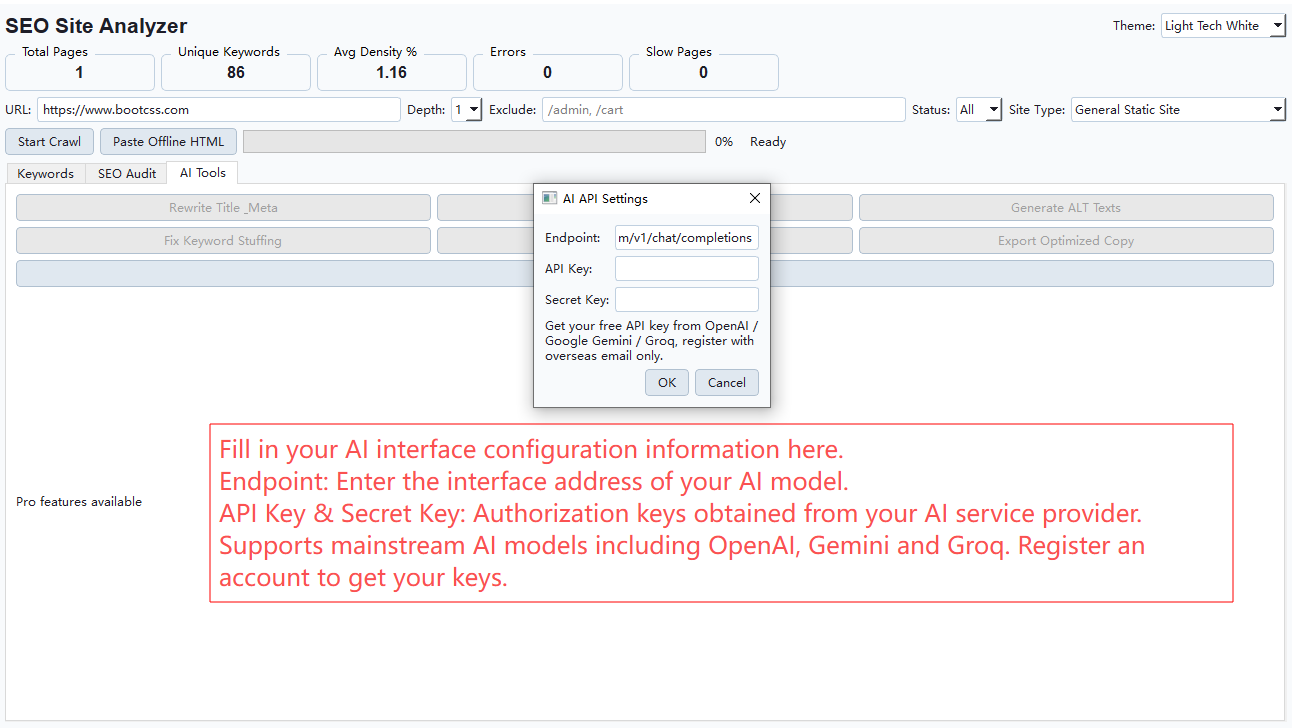
## 1. Website Crawling & Site Audit Core Module Website Audit Tool, SEO Site Analyzer Pro delivers powerful web crawling and comprehensive site audit functions for webmasters, search specialists and digital marketers. This desktop site scanner lets you input any website URL to run full-page scanning and collect core ranking metrics automatically. ### Crawl Parameter Settings – URL Input Field: Paste your target website link to launch a full-site scan – Depth Slider: Adjust crawl depth to control how many page layers the scanner captures – Exclude Paths: Block folders such as /admin, /cart to skip irrelevant content and speed up audits – Site Type Selector: Toggle modes for general static sites to match your page analysis needs ### Two Separate Analysis Modes 1. Start Crawl: Live web scanning that pulls real-time site data, fully complies with each site’s robots.txt crawl regulations. 2. Paste Offline HTML: Local source code analysis function, only reads saved HTML files and sends zero online requests to target servers, perfect when live crawling is restricted by site owners. ### Robots Restriction Notice Explanation When the tool shows `robots.txt disallows all`, the built-in prompt reads: >This site blocks crawlers via robots.txt rules, it’s the website’s official restriction, not a software issue. This reminder clarifies crawl limits come from the target site, not flaws in our page scanner. Users can utilize the offline HTML paste feature to audit locally saved page code without live network requests. ## 2. Complete Keyword Analytics Dashboard Once live crawl or offline code analysis finishes, this website audit tool generates a full keyword report packed with core performance data to streamline your page refinement workflow. ### Core Performance Metrics Overview – Total Pages: Total scanned pages counted during your full site audit – Unique Keywords: All distinct ranking phrases captured by the web scanner – Avg Density %: Average phrase density across all scanned pages to guide balanced content writing – Errors: Tally of broken pages, dead links and other technical site flaws – Slow Pages: Flag lagging pages that drag down organic search rankings ### Detailed Keyword Data Table The keyword panel displays every metric required for on-page refinement: target search phrase, occurrence count, density percentage, total word count, H1 tag matching, meta description matching, image ALT tag matching, internal inbound links, external outbound links and keyword page ranking position. ### Filter & Export Functions – Filter Low Density: Hide low-traffic phrases to focus on high-value search terms – Filter Overstuff: Identify pages with unnatural phrase overuse for compliant content revisions – Reset Filters: Clear all custom filters to restore the complete keyword dataset – Export Full Audit Report: Download full scan results locally for offline review and client reports ## 3. AI Content Tuning Tools for Automatic Page Modifications This desktop site scanner supports universal AI API connections to deliver automated content refinement, greatly reducing manual on-page editing work for webmasters and digital agencies. ### AI API Configuration Window – Endpoint: Input your compatible AI model interface address – API Key & Secret Key: Fill in authorization credentials issued by your AI service provider The AI tuning module works with three mainstream large language models: OpenAI, Gemini and Groq. Register an account with any supported provider to obtain access keys and unlock all AI automation features. ### One-Click AI Optimization Buttons – Rewrite Title_Meta: Generate search-optimized title tags and meta descriptions to boost organic traffic visibility – Fix Keyword Stuffing: Rewrite over-optimized content to eliminate unnatural phrase repetition and align with white-hat optimization standards – Generate ALT Texts: Mass-create descriptive image ALT labels to improve image search rankings and site accessibility – Export Optimized Copy: Download all AI-revised page content ready for direct website deployment ## 4. Standalone config.ini Configuration File All private API access keys, service endpoints and software preferences are securely stored in the independent config.ini file of this website audit tool. No sensitive credentials are hard-coded into the main program, fully safeguarding your tool access information. 1. GooglePageSpeed Section: Input your official Google PageSpeed Insights API key to run integrated page speed performance checks within the scanner 2. AI_API Section: Pre-configured with universal OpenAI-compatible API endpoints; swap the link and credentials to switch between different AI tuning models instantly 3. Theme Section: Default display theme is Light Tech White; edit this line to adjust the visual layout of your web crawler workspace

PC Earning
SEO Site Analyzer Pro – All-In-One Website Crawler & AI On-Page Optimization Tool
$9.90
All-in-one desktop site audit tool with built-in AI, supports web crawling, keyword tracking and one-click page optimization for webmasters.
Related products
-
PC Earning
MultiHistA Pro Universal Multi-Market CSV Data Tool
Original price was: $99.99.$79.99Current price is: $79.99. Add to cart -
PC Earning
XAUUSD Market Data Statistics Software | Gold Historical Data Tool
Original price was: $29.90.$19.90Current price is: $19.90. Add to cart


Reviews
There are no reviews yet.